Sitecore does the rendering
A management layer over the platform's own features. No proprietary runtime.
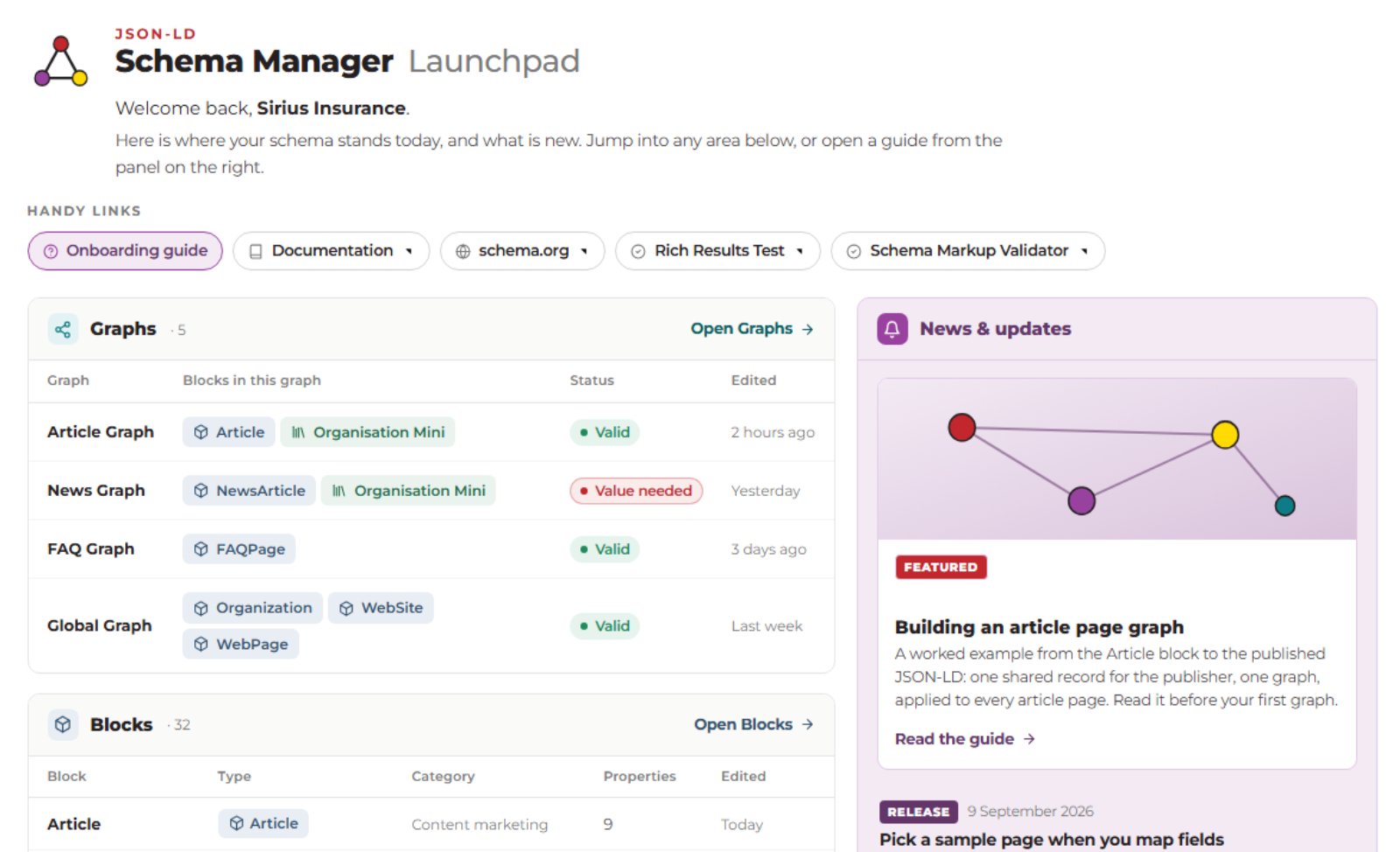
JSON-LD Schema Manager is a SitecoreAI Marketplace app that puts Schema.org structured data in the hands of the people who own the content. Marketers are guided to describe the business in JSON-LD, linking fields dynamically to page outputs, across the whole site. Developers stop fielding schema tickets and validating outputs.
The payoff lands everywhere a machine reads your site: AI agents and answer engines that cite you accurately, rich results in Google and Bing, sharper on-site search, and structured content your personalisation can act on. No code to write, no tickets to log, no release to wait for. Own your content's context.
 ⤡ Expand
Trusted and safe
A management layer over the platform's own features. No proprietary runtime.
Configuration lives as content items in your own content tree.

By people who have shipped enterprise Sitecore for years.

Built and supported by an ISO 9001 and ISO/IEC 27001 accredited provider and Microsoft CSP.
Benefits
Schema markup is how your site tells machines what is true about you. Done properly, on every page that needs it, it pays back in more places than search.
More of them, and more accurate. When your facts are declared rather than inferred, answer engines have something reliable to repeat.
Rich results and rankings in classic search are still where the revenue is. JSON-LD is the format Google recommends.
Retrieval, RAG, chatbots and internal assistants read structured content first. The same markup fuels the AI you build.
You declare the names, products, people and dates that machines repeat, instead of leaving them to guess.
Designing schema exposes the data your pages cannot supply. The gaps it surfaces are a content roadmap you did not have before.
Structured content travels: across pages, channels, segments and campaigns. Author once, use everywhere.
Declared entities give analytics and attribution something solid to count, instead of guessed-at page buckets.
Schema changes stop being release work. A ticket queue that used to cost days of development becomes an afternoon for a content author.
THE ONLY FULL-COVERAGE OPTION ON SITECOREAI
Structured data pays off from the first page, but the full return comes when it covers every page, stays true as the content changes, and points every mention of your organisation, people and products back to the same entity.
Most sites fall short on at least one of those, which is why JSON-LD Schema Manager is the only approach on SitecoreAI that covers the whole site, connects every entity with a stable identity, and changes without a developer.
Every schema type on every template is a developer ticket, specified by someone who does not write JSON-LD.
Doing it once, for every page, is a slog but keeping it accurate, relevant and valid is worse. Your content model changes, schema.org publishes a release, Google moves the goalposts, and none of it announces itself.
The markup quietly stops being true, and nobody notices until rankings or citations drop.
The first build is the big one. You need a strategy, then a brief detailed enough for developers to code from, then weeks of back and forth while they do.
Every change after that is a ticket, a place in the backlog, a sprint, a QA pass and a release. Weeks or months for something a marketer could describe in a sentence.
Multiply that by every template on every site.
Tag managers and scripts add schema on the client side, after the page has loaded. Any platform that does not run JavaScript sees none of that, and most AI crawlers miss it completely.
Google supports GTM tagging but warns that copying values into Tag Manager “increases the risk of having a mismatch between page content and the structured data”.
More info: Google Search Central - Generate structured data with JavaScript ↗
How it works
Drag, drop and click your way through it. The app builds and manages the Sitecore items underneath, so the technical part is handled while you work in plain view, with help one click away at every step.
Step 1
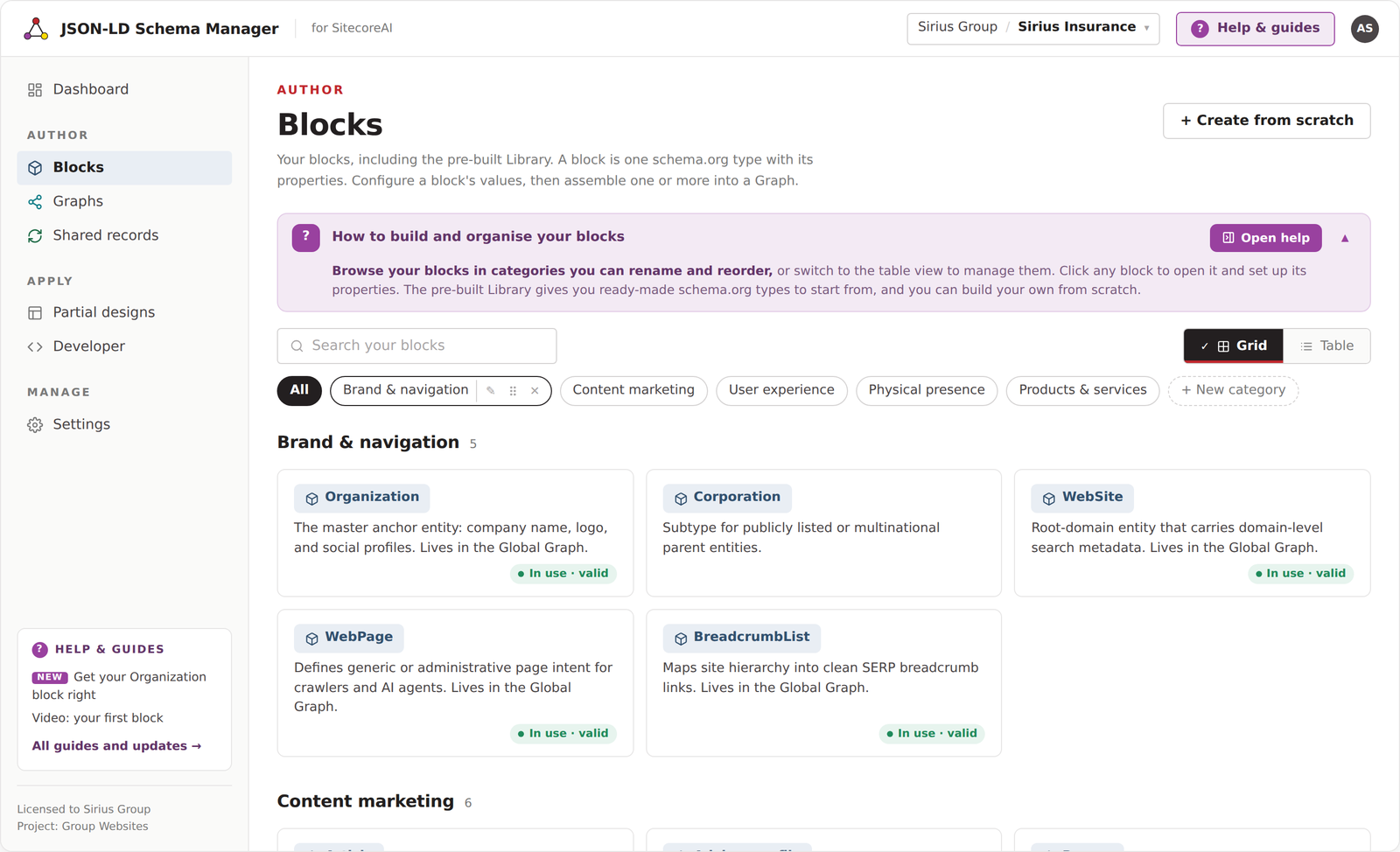
A block is one schema.org type and the properties it carries. Around 30 arrive pre-configured for the types enterprise sites actually use, and the whole schema.org catalogue sits behind them when you need more.
 ⤡ Expand
Step 2
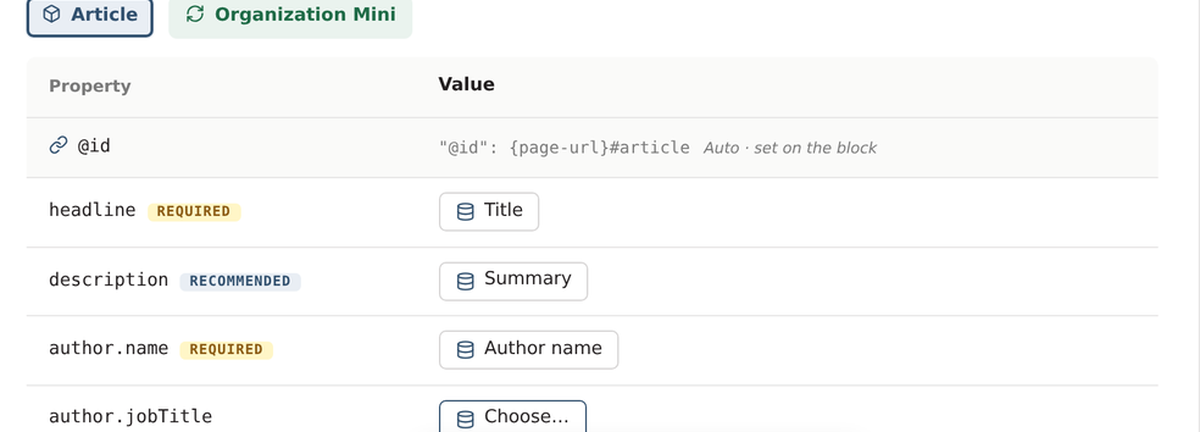
A field on the page template, a fixed value typed once, or a shared record defined above the site. Map it once and every page built on that template supplies its own value. Changing a mapping is a content change and a publish, not a release.
 ⤡ Expand
Step 3
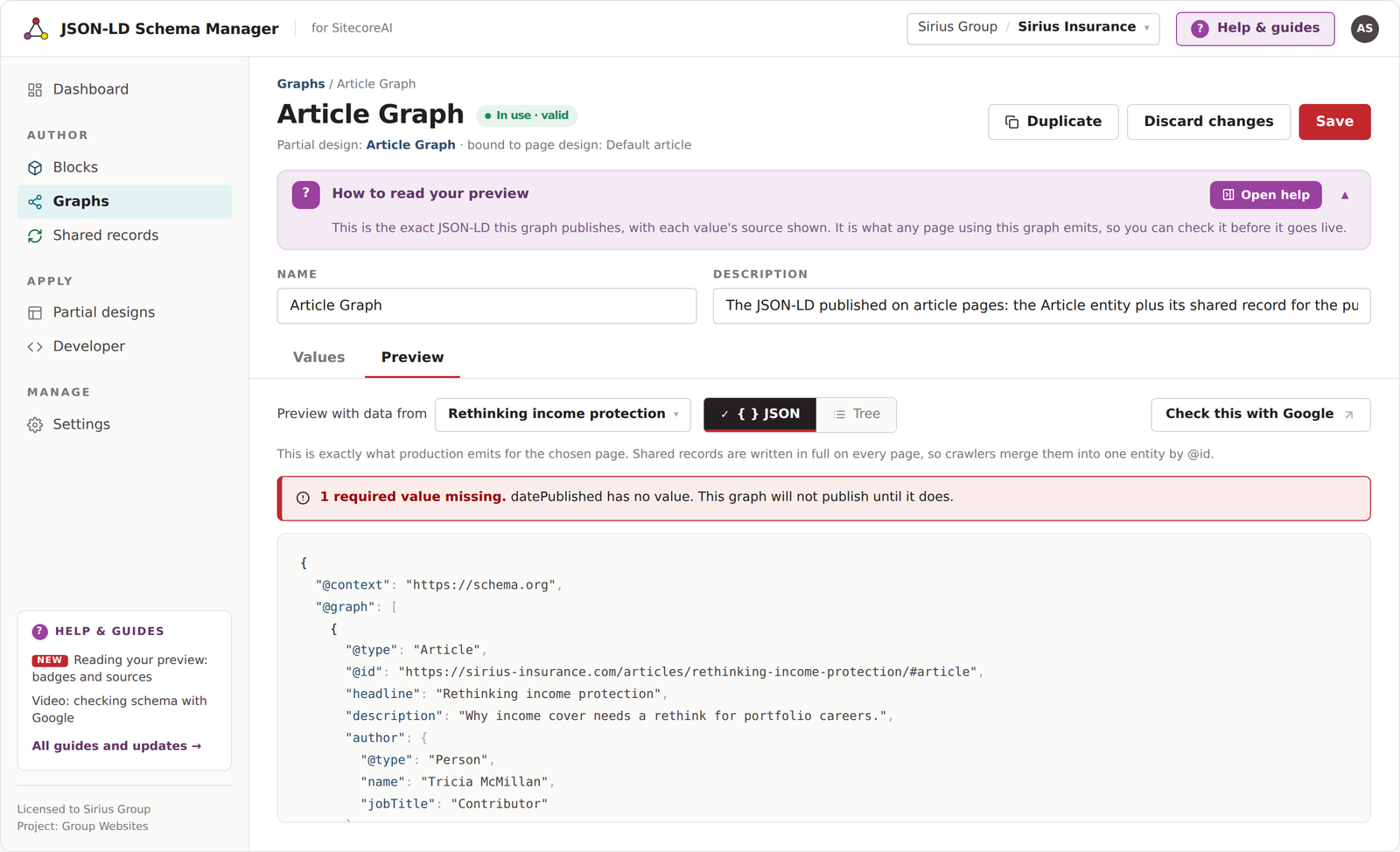
A published graph becomes a partial design and follows Sitecore's own composition model into your page designs. Check the exact output before it goes live, then send it to the Google Rich Results Test without leaving the screen.
 ⤡ Expand
Ownership
This is the question most developers ask first, so here is the plain answer. The app is a user interface that makes a set of complicated Sitecore content items easy to configure, provides strategic help to deliver the best results, and keeps them current as the schema.org vocabulary changes.
The schema configuration is content items in your own Sitecore content tree. It is your content and your IP, under your governance.
At page building and publishing time, it is your hosting and your environments, running Sitecore’s own rendering. Nothing of ours takes part in delivering a page.
Nothing about your schemas, field values or usage is held anywhere outside your own Sitecore infrastructure. There is no new place for your data to sit, so it stays inside the silos you already run.
What comes with it
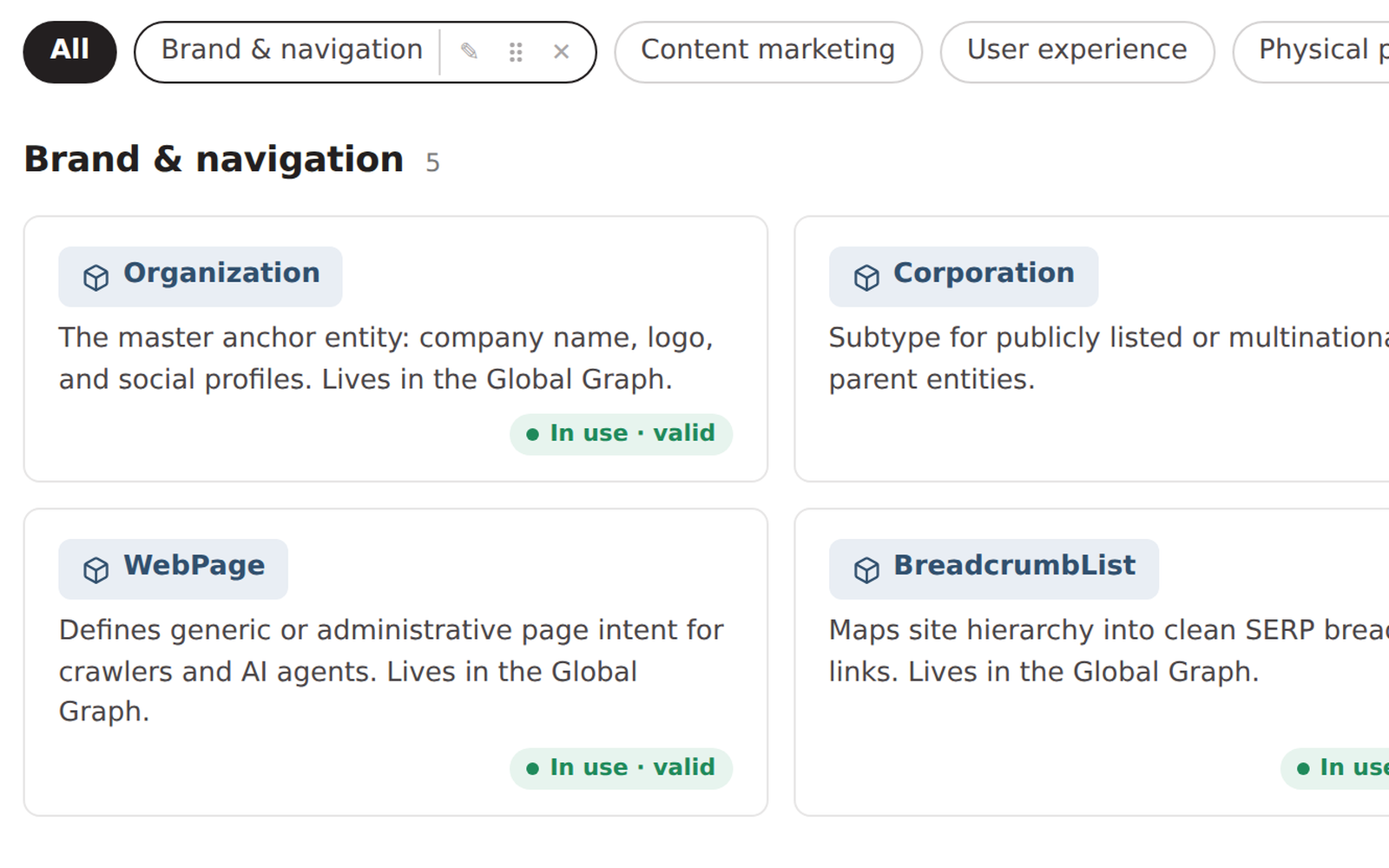
Structured data is a strategy problem before it is a technical one. This app was designed by people who solve it for enterprise clients every week, and that expertise is built in: an interface that produces rich, valid JSON-LD without a developer, a library that starts you in the right place, and the guidance to understand your schema, not just manage it.
 ⤡ Expand
Pre-configured schema types, chosen and shaped for the pages enterprise sites actually publish, ready to use on day one. Add any other type from schema.org with one click.
Publish valid, rich markup in just a few clicks.
 ⤡ Expand
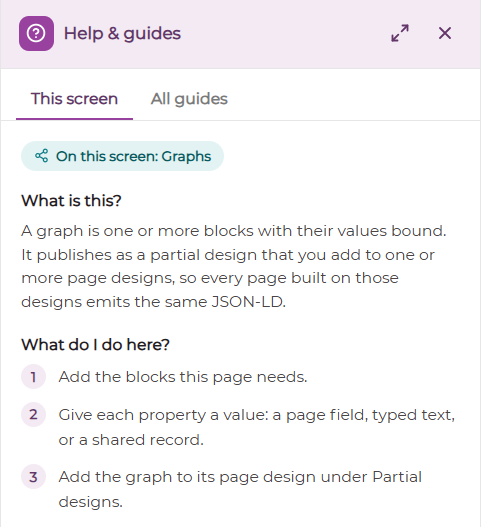
Every screen carries contextual guidance, and a help drawer with more detailed walkthroughs opens alongside the work rather than in another tab. New features and blocks are published into the same place.
 ⤡ Expand
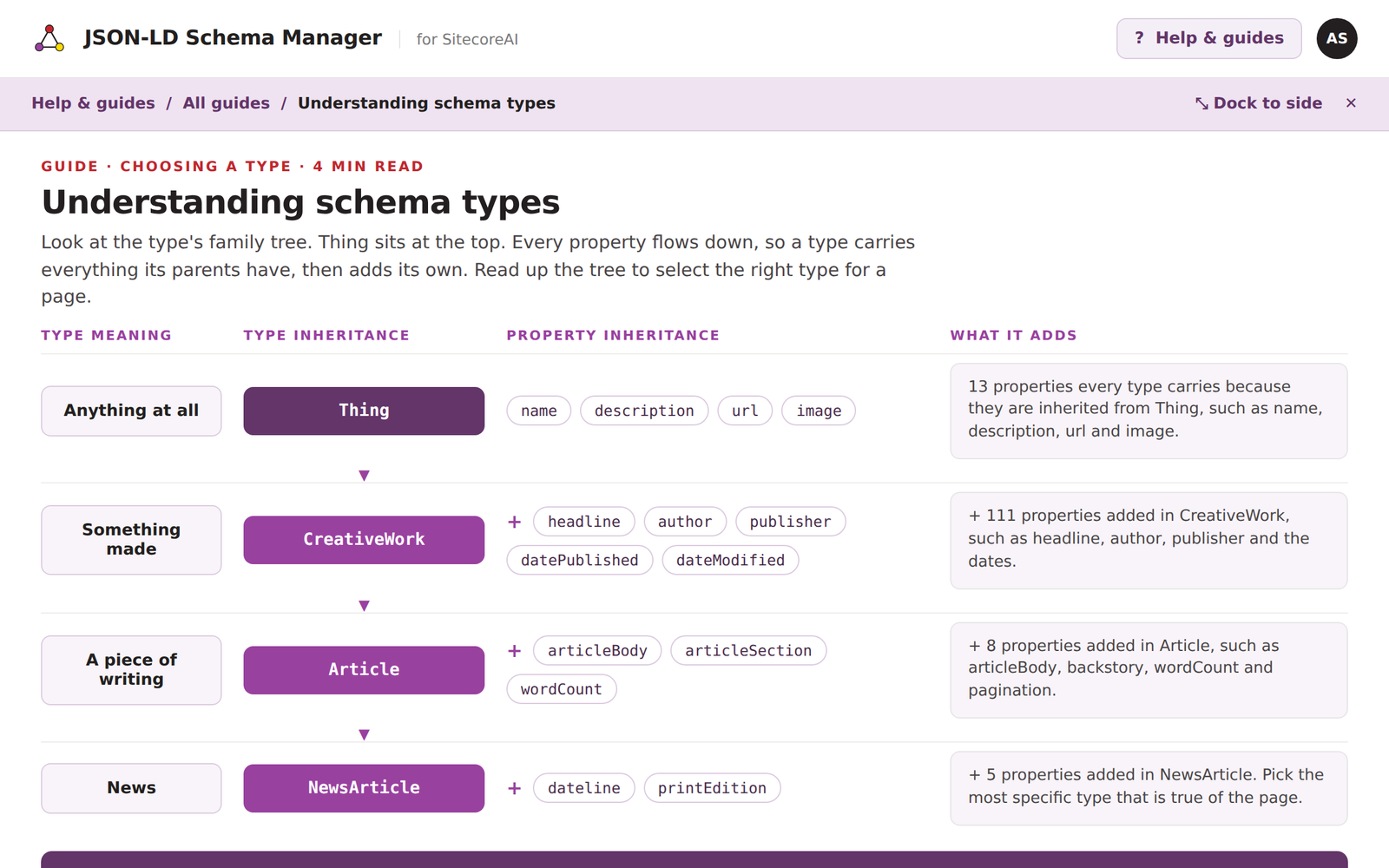
Strategy material on structured data and AI optimisation from a Sitecore Strategy MVP, plus access to the Content with Context ↗ program.
Access expert guidance on what to mark up, in what order, and what it is worth.
For Sitecore partners AND DEVELOPMENT TEAMS
Every brand needs structured data, and until now every one of them needed a developer to hand-code it, template by template: slow, tedious, and painstaking work that nobody enjoys.
JSON-LD Schema Manager takes that work off your bench. The app handles the mapping, the vocabulary, the validation and the publishing, so your team can spend its hours where the margin is: advising a client on what they should mark up, shaping content types and taxonomies to carry it, and building the custom pieces that a product cannot.
One engine, every site, and a customer who is getting fast results.
Your clients will look to you for guidance on what to mark up and in what order, how to set it up properly, and how to keep it valid as the site changes.
That is recurring advisory work, and you are closer to the client than we are.
The app gives you the tooling to deliver it in days rather than sprints.
Every customer is different, and they will need your knowledge to help them map specialised components, complex nested structures, and unique content models.
One-off build work, scoped and priced by you, on top of a system that handles everything around it.
The app emits JSON into a data source field, and we supply a component design that renders it.
You are free to implement it your way, to fit the customer's architecture. Customising the rendering does not stop your client taking product updates.
Working with a client who needs something the product does not do? Get in touch and we will walk you through the customisation points for their specific implementation, and talk about how we work with partners.
Register your interest
Register now and we will tell you the day the app goes live in the Marketplace. One message, no newsletter, no sequence.
A complimentary 20-minute consultation on your own site’s structured data, with a leading expert in schema strategy. What to mark up first, what is missing, and what it is worth. Strategy comes with the software, not as an extra.